spotify artwork, in one place
spotifybanner started with an image that's easy to see but awkward to save: the artist banner. now you can also find artist profile photos, album and track covers, and playlist artwork from the same input.
paste a public spotify link to preview the available images and download them. no spotify sign-in is needed here. this tool retrieves existing artwork; it doesn't generate new images or download music.
how to get your image
- copy a spotify link. open the artist, album, track, or playlist. copy its browser address, or use the share menu in spotify to copy its link.
- paste it above. select get artwork. artist links return the available banner and profile photo; album, track, and playlist links return cover artwork.
- check and download. each result has a preview, its dimensions once loaded, and a download button. use open image to see it on its own.
which links work?
- artist → banner & artist images
open.spotify.com/artist/…- album → cover artwork
open.spotify.com/album/…- track → its release's cover artwork
open.spotify.com/track/…- playlist → playlist cover
open.spotify.com/playlist/…
use the full link, including the letters and numbers after the type. localized links such as open.spotify.com/intl-es/album/… and spotify URIs such as spotify:album:… work too. if you have a shortened share link, open it first and copy the full spotify address.
banner or profile photo?
banner
the wide header at the top of an artist page. when a separate banner is available, it appears as its own download.
profile photo
the portrait spotify often displays in a circle. the download preserves the underlying image without the circular crop.
different sizes of the same artist photo are combined into one result, keeping the largest available version found. if a separate banner isn't found, the result says so instead of substituting a profile photo.
reading an artwork result
these Taylor Swift reference images show why a profile photo and a banner are separate downloads. the profile photo was checked on 25 September 2026; the banner is an earlier example from this project. they are not a live preview of her current page.

the downloaded image is square. a circular avatar hides its corners; saving the underlying file preserves those parts of the photo. displaying it larger does not add detail.
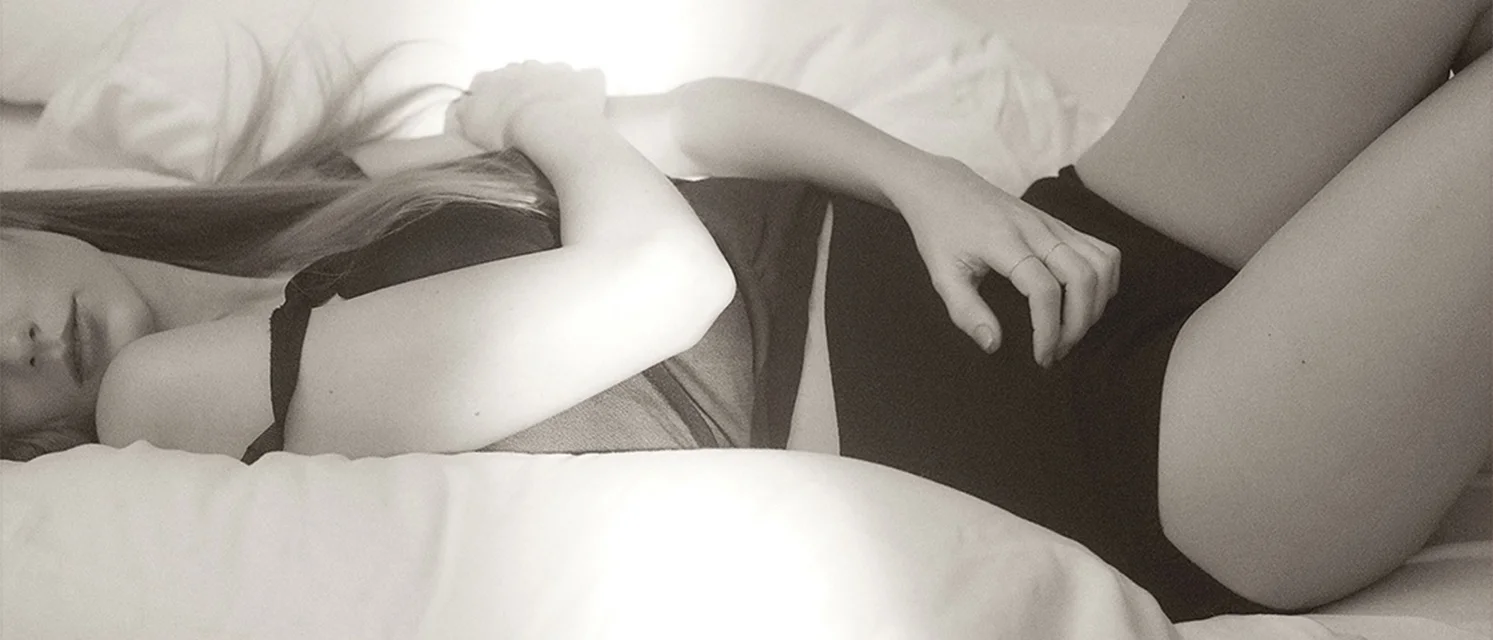
this file is wider than the profile photo and uses a different photograph. its shape is about 2.33:1, not 16:9. keep its proportions when resizing; forcing it into a square would require cropping or stretching.
sources: Taylor Swift on Spotify, profile image, earlier banner image. images belong to their respective rights holders; downloading them does not grant permission to republish them.
when the result looks different
- one photo, no banner: there may be no separate banner exposed, or the banner lookup may have failed. read the result notice; a portrait is not a substitute banner.
- two sizes of one portrait: a 320 × 320 and a 640 × 640 version can represent the same photo. the tool keeps the largest matching version it finds, rather than listing both as different images.
- different crops or overlays: Spotify can frame a photo differently and add gradients or text. the downloaded file does not include that page layout.
- an older image: cached results can remain for up to six hours. compare the source page, then try again later if its artwork has changed.
choosing a download
use download for one image, or download all images (.zip) when a result contains more than one. the ZIP contains only that result's images; a playlist link does not fetch every track's cover. copy image link uses the original Spotify image address instead of this site's temporary download file. neither link is a guarantee of permanent availability, so save a local copy if you need it later.
questions & troubleshooting
why can't it find an artist banner?
the page may not expose a separate banner, or the tool may be unable to read it. a profile photo can still appear as a separate result. if the banner service is busy or paused, the result will explain that.
why is my playlist or cover unavailable?
check that the link opens a public page in your browser. private, removed, or restricted pages may not expose artwork. a temporary spotify response or page change can also prevent extraction; try again later.
why does a track return an album cover?
the tool retrieves the artwork associated with the track's page. this is usually the cover of its album or single, so tracks from the same release can return the same image.
will i get the original resolution?
you get the image available from the page, with its actual dimensions shown after the preview loads. that isn't necessarily the artist's original upload. the tool doesn't upscale images or promise a fixed resolution. for artist photos, repeated sizes of the same image are combined into the largest version found.
why does the image look different on spotify?
spotify may crop an image to fit its layout or place a gradient and text over it. the download is the underlying artwork, not a screenshot of the whole page.
the download failed. what should i do?
use open image and your browser's save-image option. if the image no longer loads, request the artwork again. previews and download files are temporary.
why am i seeing an older image?
recent results are reused for up to six hours to keep repeated lookups fast. if an artist or playlist has just changed its artwork, check again later.
does a playlist link download every song's artwork?
it retrieves the playlist's own cover. to get an individual release's artwork, paste its track or album link separately. bulk-link extraction isn't included.